
As paying parent and the parent eligible for our services, you can delegate access to eKidWeb to the second member of your household, provided that this person is registered on the platform and their addition has been approved by the CPE administration.
What does delegation mean?
Delegation gives the second household member immediate and full access to your eKidWeb profile, including your income level and the related supporting documents.
They can carry out any actions on your behalf such as declaring an absence, enrolling a child for holiday periods, adding authorised persons, modifying contact details, etc.
How to grant delegation
- Go to Household.
- Click on the name of the second household member.
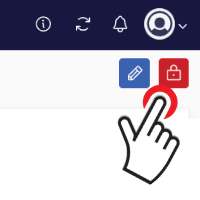
Click the lock icon to delegate access.
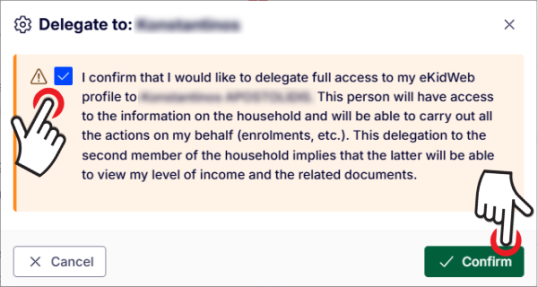
- Read the information displayed carefully.
- Tick the confirmation box.
Click Confirm.
How to revoke delegation
You can revoke delegation at any time.
- Go to Household.
- Click on the name of the second household member.
- Click the same delegation button / lock icon used to grant access.
- Confirm that you wish to revoke the delegation.
Once delegation has been revoked, the second household member will no longer have full delegated access and will return to limited access.