"School year" enrolment
Before the start of the school year
Cancellations are free of charge if requested via eKidWeb no later than 15 August.
- Click on "Children" then on the name of your child
- Click on "Enrolments"
- Click on the three vertical dots on the card named "Année scolaire + Droit vacances" of the next school year and choose "Cancel"
- Click "Confirm".
- You will receive a confirmation e-mail.
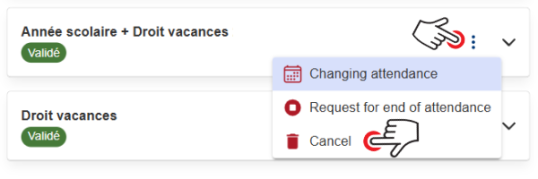
Please note that the "Holiday Right" ("Droit vacances") remains available free of charge for the next school year. Keeping this right active does not generate any costs and allows you to enrol for holiday periods if required. Any holiday periods booked will be charged according to the applicable rates.
If you wish to permanently remove the Holiday Right, please send an email to the relevant CPE.
During the school year
A request to end attendance must be made via your eKidWeb account.
"Holiday" enrolment
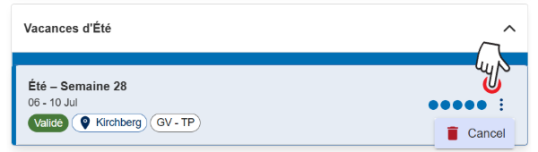
It is possible to cancel an "Holiday" enrolment (short breaks or summer holidays) until the last day of the corresponding enrolment campaign.
- Click on "Children" then on the name of your child
- Click on "Enrolments"
- Click on the three vertical dots on the card of the relevant enrolment and choose "Cancel"